
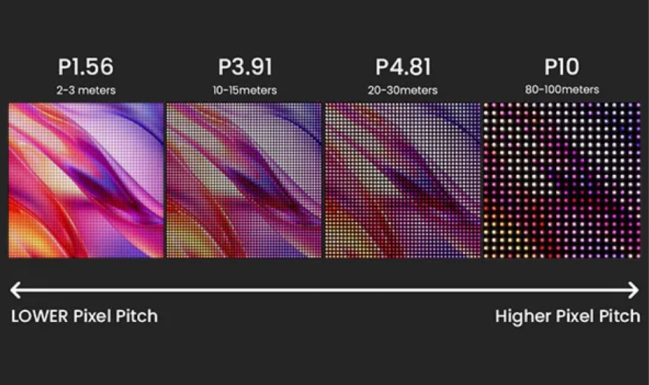
When renting or buying LED displays, you must understand what pixel pitch is, as it directly affects how clear the screen is and how many pixels it has. Pixel pitch is an important factor used to determine the clarity and the resolution of an image displayed on a digital screen.
There are times where customers do not understand the importance of selecting the appropriate pixel pitch leading to displays that may look good from a distance, but can look very blocky when viewed up close.
Understanding pixel pitch and its effects on image quality is also vital to manage expectations and to avoid displays that appear low resolution from far away. This article will explain pixel pitch and its importance, as well as how to pick the right pitch for each case, in consideration of image quality, distance from viewers, and cost of the display.
What Is Pixel Pitch?
Pixel pitch is the distance (in mm) between the center of one LED and the center of the adjacent LED in a cluster setting. It is further described as the distance between each light-emitting pixel, and the closer the pixels are, the better the image quality and the closer viewers can be to the screen.
Different pixel pitches are identified by values like P2, P2.5, P3, P4, P5, etc. A P3 screen, for example, has 3.0 mm gaps between the centers of adjacent pixels.
A digital screen’s clarity depends on the pixel pitch, which is the distance from one pixel to the other. If the pixel pitch is tighter, there is more pixel density which increases the clarity of the screen. For example, imagine a wall made of tiles. Wall surfaces made with smaller tiles are smoother than those made with larger tiles, because larger tiles lead to wider gaps and a more rough surface.
In digital screens, smaller pixel pitches result in finer and more seamless images, whereas larger pixel pitches present less smooth images due to the more visible gaps between the pixels.
What Are LED Display Pixels?
When talking about pixels on smartphones, we are usually referring to the individual parts of the screen that light up. However, pixels on LED screens are an entire unit that contain red, green, and blue LED lights, which are called an LED cluster.
These clusters are in a grid layout to create a module. Modules are fastened to a backing plate, and the assemblies are called cabinets, which are gridded out to form massive LED video walls.
When the spacing between the cluster pitches is too wide, the video will have gaps, leading to jagged text, rough images, and an overall lower picture quality, especially when the viewers are close to the screen.
If the space is close enough, however, an overall high quality, detailed, and smooth video will appear as the clusters will be close enough to render visually as a singular pixel.
Why Pixel Pitch Matters for Any LED Display
Pixel pitch impacts three crucial elements on any LED screen: clarity, distance, and price. Below you will find the breakdown of each.
Visual Clarity
Smaller pixel pitch means a greater number of pixels within the same screen area, therefore pixel density increases. Clarity will result in the following:
- Truthful images — More details will be visible in photos. Written material will be a lot easier to read, and in fact, even small text will be legible.
- Superior video — The motion of the video will be more fluid without jagged edges, and the visuals will be more polished.
Insane Impact shows that one screen with one millimeter pitch will be a lot more high-resolution than a screen with 6 mm pitch, even if their height is the same. In fact their resolution will be in a 6:1 ratio. A pitch that is smaller means you will have the ability to fit more pixels, and the result will be a more focused screen.
Viewing Distance
Pixel pitch determines how good a customer is able to see the image that is displayed considering the distance from where they are viewing the image. If the pixel pitch is too large, large gaps are likely to be seen at close viewing distances, leading to poor image quality. On the other hand, the image quality could be good at close viewing distances, but an excessively small pixel pitch would be too expensive for many outdoor displays, such as billboards.
Good design of an LED-display matches pixel pitch to viewing distance. A good rule of thumb is that 1 mm of pixel pitch is good for 8 ft of viewing distance. Therefore, a pitch of 2.5 mm is proper for displays that are viewed from 20 ft. Designing a display for optimal viewing distance where the screen pitch matches the distance of the viewer improves the display better.
Pixel Pitch & Viewing Distance Guide
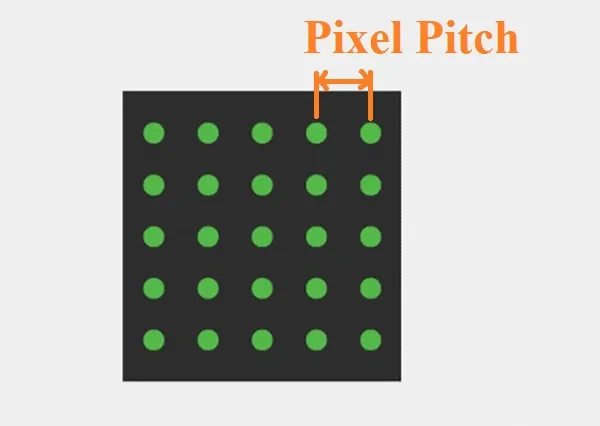
Here is a basic guide used by many customers and providers of LED screens when it comes to matching pixel pitch to distance and use-case:
| Pixel Pitch | Ideal Viewing Distance | Best Use Case |
| P2 – P2.5 | ~1–3 meters | Retail, showrooms, control rooms, indoor close-view setups |
| P3 | ~3–5 meters | Indoor events, conference rooms, smaller halls |
| P4 | ~5–8 meters | Stage backdrops, larger indoor spaces, mid-range halls |
| P5 – P6 | ~8–15 meters | Outdoor signage, hallways, mid-distance audience |
| P8 – P10+ | ~15 meters and beyond | Roadside billboards, large outdoor advertising, distant viewing environments |
One guide states, “The correct pixel pitch makes sure the individual pixels on your LED display look smooth from the appropriate viewing distance”.
Keeping in mind this table, your LED screen will show a cohesive display without any noticeable gaps and will not cost more than it should.
Pixel Pitch vs Resolution: What’s the Difference?
It is easy to confuse pixel pitch with resolution. However, they are two different, although related, characteristics.
- Pixel pitch regulates the distance between the fitted LEDs (or pixels) on the display.
- The resolution is described as how many pixels make up the display. An example would be a 1920×1080 display or a 4K display.
When the pixel pitch is smaller there are more pixels per square meter and therefore more resolution for a certain screen size.
As an example, a 1.5 mm pixel pitch display contains more LED pixels per module than a 4 mm pitch display. This means achieving a resolution such as 4K in a more compact physical space.
In short: pixel pitch determines how granular your resolution can be for a given screen size.
If you want to have a high resolution in a small space- like inside signs, corporate boardrooms, or close View screens in retail- go for fine pixel pitch. If you have large screens and viewers are far, a coarser pixel pitch is acceptable.
How to Choose the Best Pixel Pitch for Your Project
Here are expected typical usage scenarios and how best to correlate them with pixel pitch.
For Retail Stores & Showrooms
- Typical viewing distance: Customers are face-to-face (1–3 m).
- Recommended pixel pitch: P2, P2.5, or P3.
- Reason: Close pitch guarantees elevated pixel density therefore resulting in product photographs, microcopy, pricing info, promotional visuals, etc. being sharp and clear to the customer. We also provide a transparent LED screen, to improve your retail experience.
For Indoor Events & Stage Backdrops
- Typical viewing distance: People are seated or standing and are several meters away typically 3–8 m.
- Recommended pixel pitch: P3 – P4.
- Reason: There is a good amount of the resolution for the sharpness of the audience and it is a good balance for the price. When audience members are positioned a few meters away, there is no need for ultra fine pitch like P2.
Many manufacturers of indoor LED screens for video walls, stage backdrops or conference halls use this pitch style.
For Outdoor Signage
- Typical viewing distance: This is mid-range, in some cases 5–15 m or more.
- Recommended pixel pitch: P5 – P8.
- Why: We consider a distance of this range to be ideal, the human eye is not capable of viewing and being close to LED with small gaps.
Pitches of larger spacing are cheaper to make and these parameters are generally enough for sights like outdoor advertising, building facades, or signposts where the audience is not positioned close to.
For Billboards or Large Outdoor Displays
- Typical viewing distance: Far — 15 m and above, often dozens of meters.
- Recommended pixel pitch: P10+ (or larger).
- Why: From a distance, even large pixel spacing will look smooth. Opting for a larger pitch lowers expenses and increases practicality of large format displays.
Large pixel pitches are common for outdoor LED screens like jumbotrons and roadside billboards. For this reason, older LED walls are often designed with 16 mm, 20 mm, or larger pitches.
Common Mistakes People Make When Choosing Pixel Pitch
LED displays are often chosen incorrectly. The most common mistakes are:
- Assuming an overly tight pixel pitch on the screen
Purchasing P2 while the audience is at least 10-15m away is an inefficient use of budget as the additional pixel density won’t be perceptible at that distance. - Utilizing overly aggressive pitch for an indoor close-view application
Indoors, a display featuring a P6 may appear to have a clearly discernible pixelation when viewers are positioned nearby. - Ignoring viewing distance
Not calculating how far your audience will be seated from your presentation. Viewing distance is the most important factor. - Mixing up pixel pitch with brightness
A pixel pitch does indeed determine the level of clarity and density. Brightness however is a different attribute. If an LED screen is very bright, but has very coarse spacing, the sharpness will not improve. - Neglecting to test the actual content visibility prior to deployment
If the pitch is wrong for your viewing distance, logos, small text, and intricate videos may lose some of their visibility. - Selection only made on the basis of price
Opting for the most affordable alternative (largest pitch) may negatively impact the experience at close or mid range viewing distances.
Steering clear of such pitfalls guarantees that your LED display will meet your performance and visual quality expectations without overspending.
Pixel Pitch & Content Quality
Smaller pixel pitch contributes to better displayed content quality in a number of ways:
- Text: More compact types are legible only if the pixel pitch is finer. Larger pitch will make thin fonts jagged or even unreadable.
- Video playback: Some videos can be smooth and others can be choppy depending on pixel density. Choppy videos do not identify fine details, and coarse pixel pitch can make and hold choppy videos.
- Logos and graphics: Higher pixel density improves fine details, sharpness, and edges of logos and graphics. Coarser pixel spacing can distort fine details.
- Animations: Displays that have fine pixel pitch look better with more detailed subtle animations.
Therefore, if your content includes detailed animations, logos, product images, or text that needs to be legible, it is important that your LED pixels are spaced more closely.
Simplistic large-format graphics, or large images that are to be viewed from far away (like a billboard) do not require as closely spaced pixels.
Choose the Right Pixel Pitch for Best Results
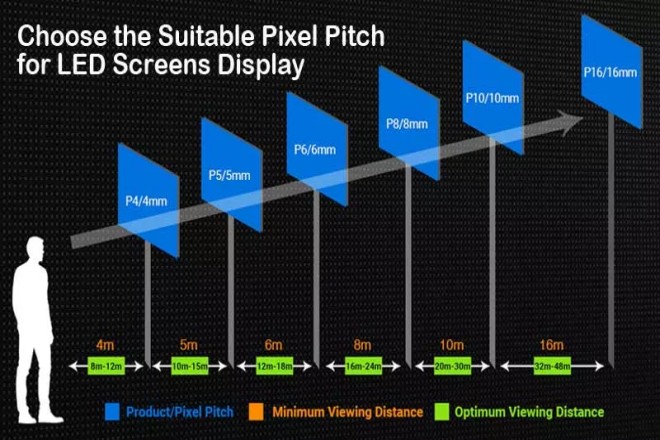
Selecting an appropriate pixel pitch helps achieve a professional LED display that is sharp, and meets your visual and budgetary requirements. It is a common misconception that the most important factor is “the smallest pitch possible”, however, the correct pitch is more important when considering the distance from which an audience will be viewing the display and the intended purpose.
If the appropriate pixel size is synced to viewing distance, you get clarity, high resolution, and value. If not, you get the risk of pixelated images and poor readability of the text, and you may overspend without any real benefits.
When purchasing or renting LED screens, knowing about pixel pitch, pixel density of the LED display, and their impact on content quality, will help you make better decisions.
Rent LED Screens From Us
Do you need assistance selecting the best LED pixel pitch for your business/event?
We offer rentals of indoor and outdoor LED screens across all pixel pitches including P2, P2.5, P3, P4, P5, P6, P8, and P10+.
Share your venue layout, desired screen dimensions, and anticipated distance of viewers and we will provide a recommendation for LED screen pixel pitch and pixel density that best optimizes your budget and screen clarity for your audience.
YOUR COMMENT